The Missing Link in AI Proposals: Introducing the "Human-in-the-Loop" Approval Flow

Last week, we released our Proposal Generation Agent, a powerful tool that turns raw notes into a 10-page business proposal in seconds. It was fast, impressive, and fully autonomous.
But for high-stakes Enterprise deals, "fully autonomous" can be scary. You don't just want speed; you want control.
Today, we are releasing the Proposal Approval Flow—a major upgrade that splits the process into two stages, giving you the power to review, edit, and perfect every document before it ever touches your client’s inbox.
V1 vs. V2: What’s Different?
The Original Agent (V1):
- Workflow: Form Submission → AI Generates Doc → PDF Created → Sent Immediately.
- The Risk: If the AI hallucinated a price or missed a nuance, it was too late. The email was already gone.
The New Approval Flow (V2):
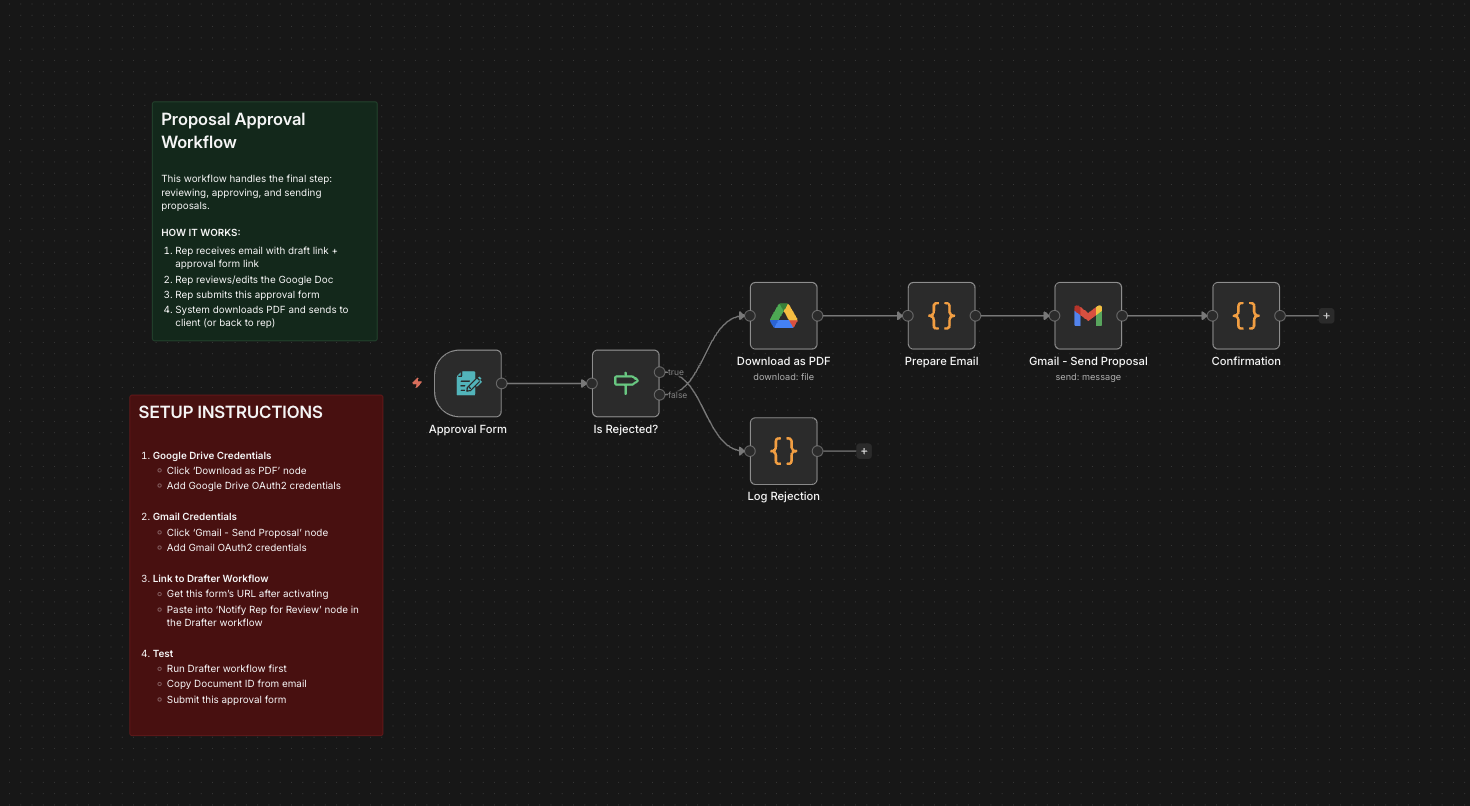
- Workflow: Form Submission → AI Generates Draft → Rep Notified → Rep Edits in Google Docs → Rep Clicks "Approve" → PDF Created → Sent.
- The Benefit: You get the speed of AI writing with the safety and precision of human review.
Why This "Human-in-the-Loop" Model Matters
We believe the future of sales isn't AI replacing humans; it's AI supercharging humans. This new flow protects your deal in some critical ways:
- Hallucination Safety Net: AI helps with math, but it isn't perfect. This flow lets you double-check the ROI calculations and pricing tables to ensure accuracy.
- The Personal Factor: AI can write a great Executive Summary, but it doesn't know you had lunch with the prospect last Tuesday. The review stage lets you add those hyper-personal "P.S." notes that actually build relationships.
- Review, Don't Write: It is significantly faster to edit a draft than to write one from scratch. You still save hours of work, but you maintain 100% ownership of the final output.
How to Use the New Stack
This isn't just one agent anymore; it's a Sales Engineering System. It consists of two connected workflows:
1. The "Drafter" (Stage 1) You trigger this agent just like before. It takes your client notes, calculates the financials, and writes the Google Doc. But instead of sending it, it marks the file as DRAFT and sends you a notification (via Slack or Email) saying: "Hey, the proposal for Acme Corp is ready for review."
2. The "Approver" (Stage 2) Once you've opened the Google Doc and made your final tweaks, you simply click the "Approve" link provided in the notification. This triggers the second agent, which instantly converts your polished Google Doc into a professional PDF and delivers it to the client.
Get the Templates
To deploy this system, you need both the updated Drafter Template and the new Approval Template.
We have packaged them together for our subscribers. Subscribe below to get instant access to the "Proposal Automation Suite" and start closing deals with confidence.