Introducing the RFP & Security Questionnaire Auto-Filler

If you work in B2B sales, you know the feeling. You’re close to closing a major deal. The champion is on board, the budget is approved, and then... thud.
An email lands in your inbox with the subject line: "Security_Assessment_Questionnaire_FINAL_v3.xlsx"
It’s 150 rows of questions about encryption standards, data residency, and SOC 2 compliance. Your Sales Engineer is booked out for two weeks. Do you spend your weekend filling it out, or do you let the deal stall?
Today, we are releasing the RFP & Security Questionnaire Auto-Filler, a free n8n agent template that turns hours of spreadsheet hell into minutes of review.
What This Agent Does
This isn't just a chatbot that summarizes text. This is a structured workflow designed specifically for the rigid, high-stakes format of security questionnaires.
It takes a raw Excel or CSV file from a prospect, reads every question row-by-row, searches your internal knowledge base for the exact answer, and—crucially—grades its own work.
How It Works
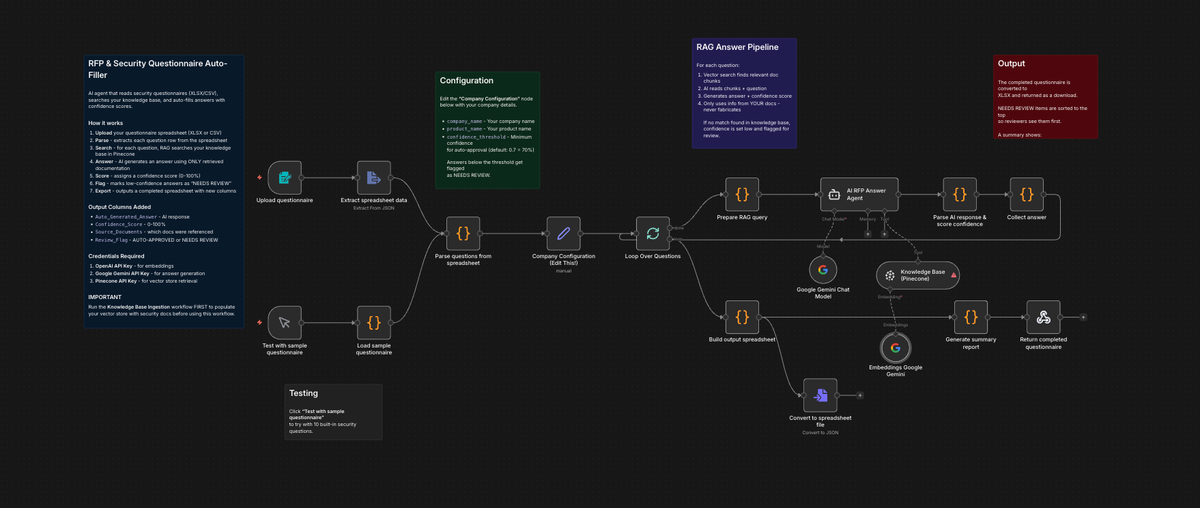
We built this agent using n8n, Google Gemini, and Pinecone. Here is the step-by-step flow:
- The Ingestion (Pre-Flight): Before running this agent, you use our Ingestion Workflow to index your security whitepapers, previous RFPs, and compliance docs into a Pinecone vector database. This creates the "brain."
- The Upload: You simply upload the prospect's spreadsheet. The agent automatically detects which columns contain the "Question" and "Section."
- The Strict RAG Search: For every single row, the agent acts as a researcher. It queries your Pinecone database for relevant documentation. We have prompted the AI with a strict rule: "ONLY use information found in the knowledge base. Do NOT fabricate answers."
- The Confidence Score (The Killer Feature): This is where this agent shines. It doesn't just spit out an answer; it calculates a Confidence Score (0–100%).
- 90-100%: Direct match found in docs.
- Below 70%: The agent flags the row as "NEEDS REVIEW."
- The Output: The agent generates a new spreadsheet for you to download. It sorts the "Needs Review" items to the top so you (or your SE) can focus only on the tricky questions, while the easy ones (like "Do you support MFA?") are auto-filled and approved.
Why It Matters
Most AI tools fail at RFPs because they try to be too creative. You don't want creativity in a security audit; you want accuracy.
- It prevents hallucinations: By enforcing a strict RAG (Retrieval-Augmented Generation) loop, the AI admits when it doesn't know the answer rather than making one up.
- It keeps humans in the loop: The "Review Flag" column ensures you aren't blindly sending AI-generated text to a prospect. You review the low-confidence answers; the AI handles the grunt work.
- It saves massive time: In our tests, this workflow reduced the time spent on a 50-question security sheet from 3 hours to roughly 15 minutes.
Get the Template
Stop letting security questionnaires block your revenue.
Subscribe to AI Sales Agent HQ today to download this free RFP Auto-Filler Template, along with the setup guide for n8n and Pinecone.